class: middle <span>.eight[CSET-110]</span><br> <span>.eight[Web Development I]</span> <br> <br> # HTML Basics --- # Today's Goal To create our first HTML document and learn how to use some common tags. --- class: middle, center  ??? What is this? A letter. You know because you've learned this, you've seen plenty of them before. --- class: middle, center 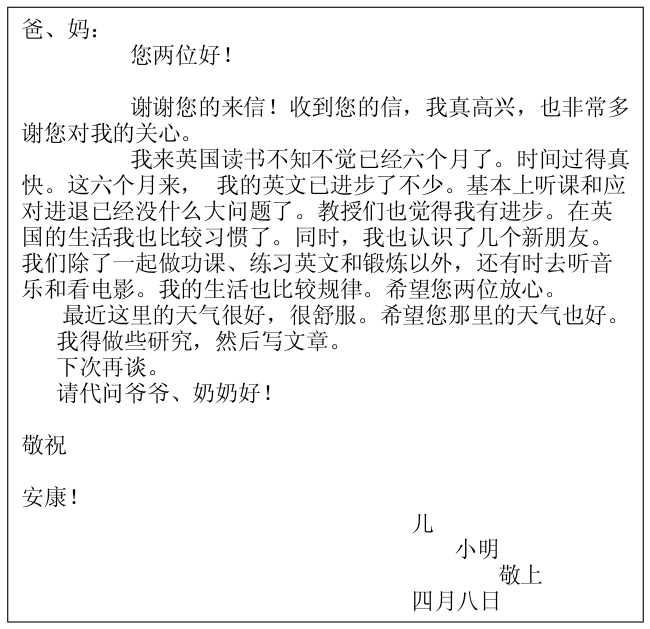 --- # What are the parts of a letter? --- count: false # What are the parts of a letter? - Heading - Greeting - Body - Salutation The envelope has other parts: to address, from address, stamp, etc. ??? You also know this, because you learned this. Time for a weird question: --- # .eight[Does the paper know what these parts are?] --- count: false # .eight[Does the paper know what these parts are?] # Of course not! ??? Our conventions tell us where to put these parts on the paper and in what order, but that's it. --- # Now let's imagine that letter as a web page. # .eight[Does the computer know what these parts are?] --- class: middle, center # .eleven[Only if you tell it.] --- class: middle, center  ??? What do you think? Why would a computer need to know the parts of a letter? --- class: middle, center # Paper stores and displays data in written language. # But a web page stores data in binary. --- class: middle, center # .eight[Syntax] ## vs # .eight[Semantics] --- class: middle, center <img alt="Yoda Quote" src="https://i.imgur.com/duxwrb3.jpg" width="100%"/> --- class: middle, center <img alt="Chomsky Quote" src="https://quotefancy.com/media/wallpaper/3840x2160/376737-Noam-Chomsky-Quote-Colorless-green-ideas-sleep-furiously.jpg" width="100%"/> --- # Two Ways To Be Correct - Syntactically: we've followed the rules of the language - Semantically: we've properly communicated our meaning --- class: middle <table class="align-center"> <thead> <tr> <th class="empty"></th> <th>Incorrect<br />Syntax</th> <th>Correct<br />Syntax</th> </tr> </thead> <tbody> <tr> <th class="x-heading">Incorrect<br />Semantics</th> <td class="eleven">X</td> <td class="eleven">X</td> </tr> <tr> <th class="x-heading">Correct<br />Semantics</th> <td class="eleven">X</td> <td class="fourteen">√</td> </tr> </tbody> </table> --- # Forget About Rules For A Second ```sh $ cd ~/Desktop $ echo "Hello World" > hello.html ``` --- # How To Handle HTML Files? 1. Right click the HTML file 2. Click "Get Info" 3. In the "Open With" section, select "Google Chrome" 4. Then click "Change All..." button --- # Your First Web Page! :D Now you can double-click your file and open it in Chrome! p.s. - you can also use .eight[open hello.html] in your terminal --- # But It's Wrong :( Syntactically? or Semantically? --- # HTML is a Specification - [Read it](https://www.w3.org/TR/html52/) if you want, it's boring. - A specification is an agreed upon way for: - You to write it - Browsers to display it The translation of code to its display is called .eight[rendering]. --- # HTML 5 - Newest version of the spec - Plenty of older versions - Every web page needs to .eight[declare] it's version --- class: middle # `<!DOCTYPE html>` ??? This isn't a tag. It's a document declaration. Back in the day, everything on the web was a document. Not declaring a valid doctype will get you into "quirks" mode. --- class: middle, center # .eight[Everything else is Tags!!!] --- class: middle, center  ??? Pair of Angle Brackets + Tag Name + Optional Attributes. Open vs Closing tag is just the slash. No attributes in closing tags. Think of this as closing the lid on your box. --- # Attributes - Modify the tag's default behavior - Provide more information about it. ??? Like command line flags. --- class: middle, center # Attributes always come in name/value pairs # .eight[name="value"] --- # Examples # .eight[id="unique-identifier"] # .eight[href="some-link.com"] # .eight[checked] --- count: false # Examples # .eight[id="unique-identifier"] # .eight[href="some-link.com"] # .eight[checked]="checked" --- class: middle, center # A tag without attributes still has attributes. # .eight[Default Attributes] ??? Different for each tag, occasionally different across browsers. Remember the spec is just a set of rules, no one enforces them. --- # Attributes - Can be in any order. - Only in the opening tag. --- # Tags vs. Elements - The .eight[Tag] creates the .eight[Element] - Tags -> Source Code - Elements -> Display ??? Written input vs. rendered output. --- # DOM - Document Object Model - An outline of your elements rendered on screen - Eventually, we'll learn to manipulate the DOM --- class: middle, center 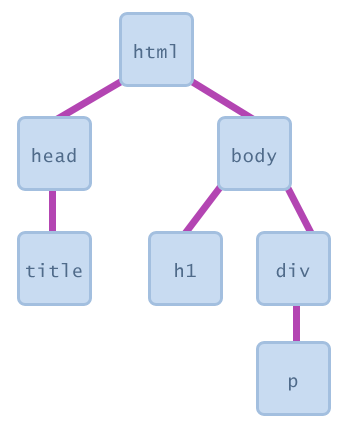 ??? Think of your web page like an outline, each item is called a node. --- # Nesting Elements - Wrapping content with a tag creates .eight[meaning] - Wrapping tags with tags creates .eight[organization] --- class: middle, center  --- # .eight[do this] ```html <parent> <child>...</child> </parent> ``` # .eleven[not this] ```html <parent> <child>...</parent> </child> ``` --- class: middle, center  --- class: middle, center # It's important for you to know the spec, but .eight[more important] to know how different browsers interpret that spec. --- class: middle, center # Break Time --- class: middle, center # Let's look at some tags! --- # Places to look: - HTML5 Spec - Google - StackOverflow --- count: false # Places to look: - HTML5 Spec - Google - StackOverflow - Mozilla Developer Network --- class: middle, center # [MDN's HTML Reference](https://developer.mozilla.org/en-US/docs/Web/HTML/Element) --- # Tags you need to know for tomorrow: ``` - html - h1 - h6 - div - head / body - p - ol / ul - meta - a - li - title - img - comments ```